
Start with the block. Get specific about the day.
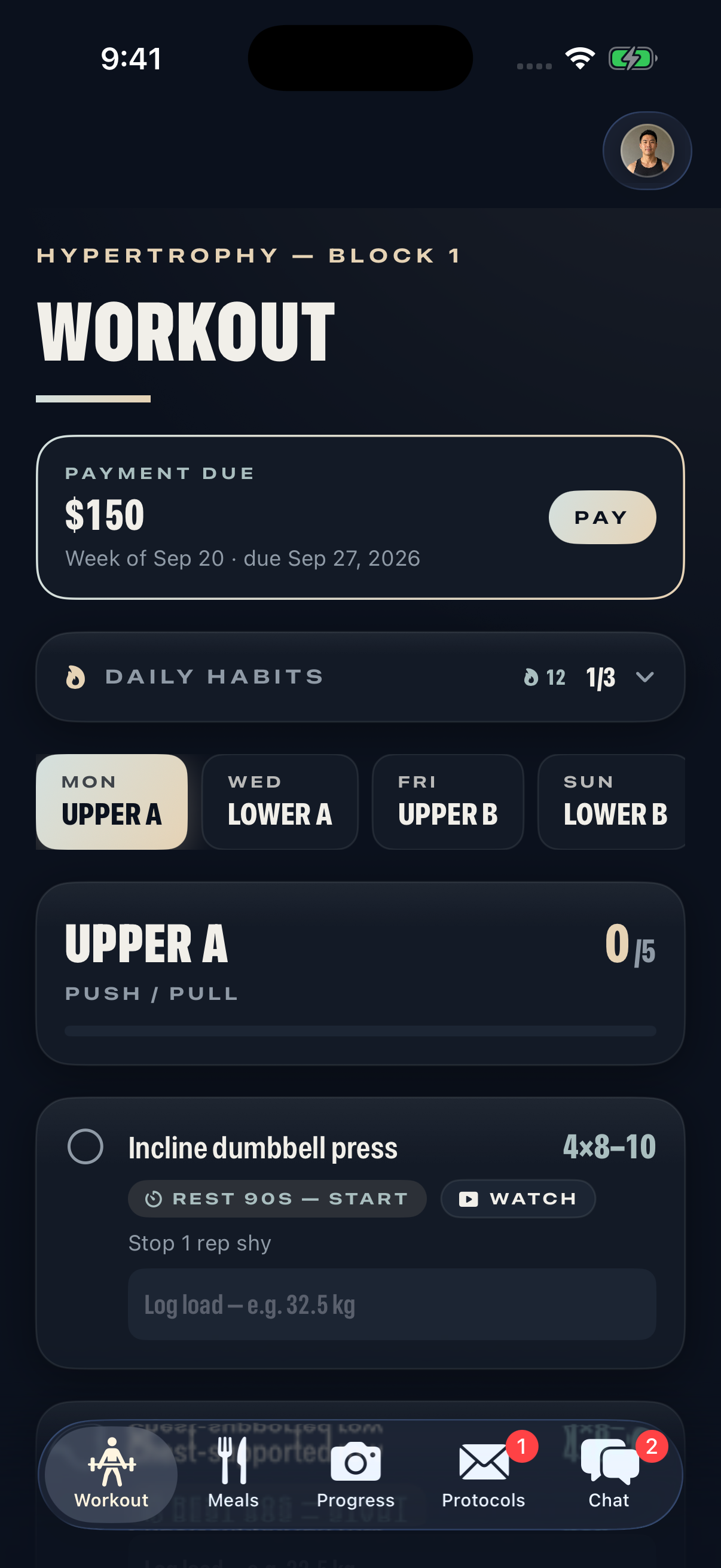
A training block sets the context. Individual days tell the client what to do next. In Alurefit, a coach can organise a block into named sessions, then give each exercise a set target, rep range, rest period and coaching note.
The day picker keeps the assigned week visible. A client can open the relevant session, read the instruction and mark exercises complete as they train. The current build also rolls exercise completion into a fresh week while retaining previous load references.
What a useful exercise brief includes.
Example from the demo programme
- Exercise
- Incline dumbbell press
- Prescription
- 4 sets × 8–10 reps
- Rest
- 90 seconds
- Coaching note
- Stop 1 rep shy
- Client record
- Load used, entered after training
This illustrates how an exercise is recorded in the app. A coach sets the programme for the individual client.
Clear fields prevent the client from having to guess which number means sets, whether a load is per dumbbell or total, or whether a note applies to one exercise or the whole session. Add that detail when you write the plan.
Keep the next action close.
The Workout screen places the demonstration link, rest timer and load entry alongside the exercise. A video link opens in the app. Tapping the rest control starts a countdown. A completion control records that the exercise is done.
Daily habits sit in a compact row above the session list. They can expand when needed without making the client work through another checklist before reaching their workout.
The screenshot on this page is from the native iOS development build. Alurefit is in early access development, and the public app release is still ahead.
Make the log useful at the next review.
An exercise tick answers one question: was it completed? A load log adds another piece of context. Before changing the next block, combine those records with the client’s explanation of how the week went.
Use the weekly check-in template to ask what worked, what got in the way and what needs to change. If you are setting up a client for the first time, start with the onboarding checklist so the programme fits the time and equipment they actually have.
A few useful answers.
Can a client log the weight they used?
Yes. The current iOS build includes a load field on each assigned exercise and retains previous-week references when the training week rolls over.
Does Alurefit automatically prescribe a training programme?
The workflows described here are coach-authored. The coach chooses the programme, exercise instructions and adjustments.
Are exercise demonstrations included?
The development build supports exercise video links and a Watch control that opens the linked demonstration in the app.